 InCue
InCuePractical guide · Updated 22 October 2026
Plan & role comparison
On this page
Edition 1.1 | 22 October 2026
Evidence: current implementation and safe local UI fixtures. Live account grants, paid transactions, OTP delivery and device hardware were not exercised. “Available” is not an SLA or a claim of production acceptance testing.
Default plan comparison
| Default entitlement | Starter | Growth | Pro |
|---|---|---|---|
| Monthly, before GST | ₹499 | ₹999 | ₹1,499 |
| Yearly, before GST | ₹4,999 | ₹9,999 | ₹14,999 |
| Display devices | 1 | Up to 3 | Up to 5 |
| Staff / Dashboard users | 1 | Up to 3 | Up to 8 |
| QR, tracking, token generation | Included | Included | Included |
| Activity logs | Included by current default plan | Included | Included |
| Analytics | Basic | Advanced | Full |
| Auto-complete on next | Not in default plan | Included capability | Included capability |
| Multi-counter / advance appointments | Not in default plan | Included capability | Included capability |
| Export entitlement | No | No | Yes; usable download UI not verified |
| Priority support flag | No | No | Yes; no response-time guarantee documented |
This table matches inspected default plan definitions and the dated public prices, not a read of your production contract. Included capability still needs configuration. Special account grants, offers and add-ons can alter limits. Yearly prices are the stated amounts, not a calculation you should replace with exactly 10 times the monthly price. Plan GST is shown in checkout/invoice; the default configuration uses 18%, but rely on your issued invoice and applicable billing details.
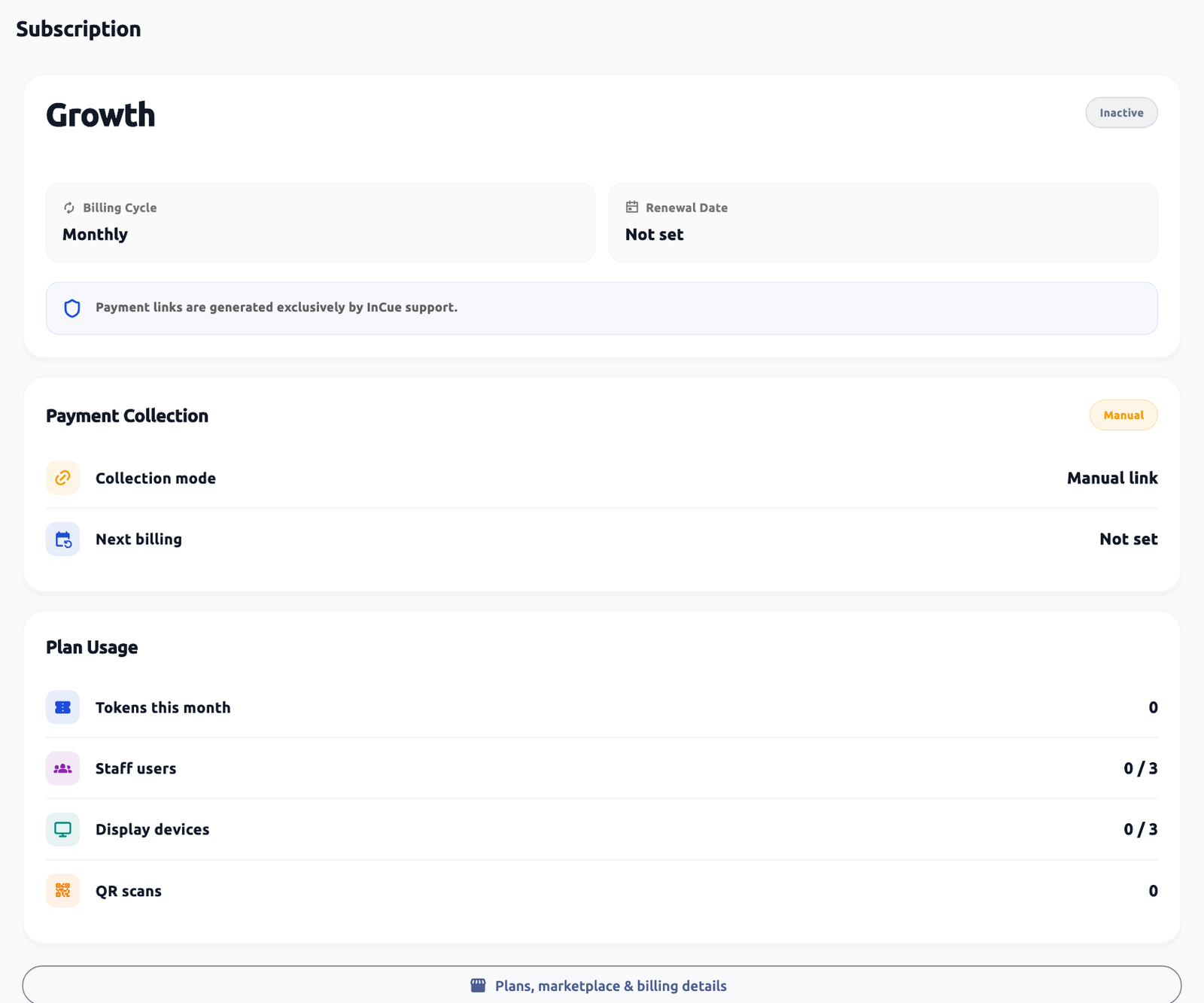 Subscription status and marketplace entry. Actual application interface with synthetic example data.1.Check actual plan status and service dates.2.Open plans/marketplace details where available.
Actual role permissions
| Operation | Merchant owner | Dashboard user | Counter user | Customer / TV |
|---|---|---|---|---|
| Configure services, custom field definitions, business/TV settings | Allowed | Restricted | Restricted | Restricted |
| Fill required token inputs | Allowed in available token workflow | Allowed with generation/queue access | Depends on offered operational controls and permission | Customer fills only own QR form; TV read-only |
| Call, start, hold, complete | Allowed within account rules | Queue/call/complete permissions | Assigned services, own active slot and permissions | Restricted |
| Cancel waiting token | Allowed | Completion/queue permission | Only if offered and in permitted scope | No general customer cancel control verified |
| Transfer called token | Allowed in supported Dashboard workflow | Queue management; eligible target required | Restricted in Counter mode | Restricted |
| Reports | Account/plan dependent | Explicit Reports access; offered date scope | Restricted as exposed | Restricted |
| Customer visit history | Owner/available workflow | Explicit Customer history permission | Restricted | No access to other visits |
| Staff, devices and billing administration | Allowed with account entitlement | Restricted | Restricted | Restricted |
Roles such as “manager” are not a separate configurable role in the inspected merchant editor. Assign the actual permissions instead. Backend compatibility accepts several permission names, but the customer editor does not expose an arbitrary custom-role builder. A copied staff URL cannot override server permissions.
Capability status and operating boundaries
| Capability | Status | Practical boundary / alternative |
|---|---|---|
| Digital queue, manual walk-in, public QR and tracking | Available in implementation, subject to active account | Internet and business/service eligibility still apply. |
| Owner-defined token/appointment fields | Available now | Maximum 20 definitions; staff fill answers only. |
| Public TV details | Available with configuration | At most 2 optional details; choose carefully for privacy. |
| Daily QR cap including staff issue count | Available with configuration | Does not cap staff issuance; prepaid holds and accepted-payment recovery have special handling. |
| Free revisits | Available when enabled | Same identity, earlier paid/completed service, validity/count limits; no universal free-all-services rule. |
| Advance appointments | Selected plans and owner configuration | Use available staff Dashboard workflow; a public customer self-booking flow was not verified. |
| Compatible counter routing | Plan/configuration dependent | A Counter user needs assigned services and available capacity. |
| Transfer after work already started | Not offered in the verified Dashboard action | Transfer Called work before Start; obtain a supported supervisor decision otherwise. |
| Undo every completed/cancelled/no-show action | Not supported as a general verified operation | Review history and contact support before creating a replacement record. |
| Automatic customer refund on token cancellation | Not supported | Refund through the approved payment provider, then record/reconcile as offered. |
| Ads on TV | Paid add-on | Active creative, working media host, supported codecs and queue timing required. |
| WhatsApp alerts | Optional paid usage/account activation | Provider acceptance/delivery/read are different; queue operation is separate. |
| Custom WhatsApp message/template editor for merchants | Not verified | TV completion text is configurable; ask support about message/template requirements. |
| External review link | Available with configuration | Reviews remain at the external site; no automatic rating import. |
| Report export | Pro entitlement exists; usable current download UI not verified | Request the required export from support; do not invent a button. |
| Multi-outlet consolidated owner switch | Not verified in the current merchant navigation | Ask support about separate location setup. |
| Custom manager-role builder | Not verified | Use supported Dashboard/Counter access and actual permission switches. |
| Automatic customer identity proof from name/mobile | Not provided by revisit matching | Use an appropriate assisted identity policy; matching is not OTP verification. |
| Full offline token issuance | Not verified/supported as a complete workflow | Cached screens are informational; wait for acknowledged server actions. |
| Guaranteed ETA, WhatsApp delivery, ad views or every-TV compatibility | Not guaranteed | Test devices and use staff communication when a channel is unavailable. |
| Medical records, diagnosis, inventory, vehicle repair job cards or GST filing | Not verified as customer operating features | Use an appropriate separate system; do not repurpose custom fields for unnecessary sensitive records. |
“Available” above refers to inspected implementation/local checks, not a paid production transaction executed during this documentation task. Support activation, current catalog grants and app version can affect your account. No unconfirmed roadmap item is labelled Coming soon except the wording actually present in a feature card.
Commercial dependency reference
| Item | Dated reference / action |
|---|---|
| Extra display | ₹100 + GST per display/month beyond included entitlement; check quote/activation. |
| Extra staff/dashboard user | ₹100 + GST per user/month beyond included entitlement; check quote/activation. |
| Ads on TV | ₹499 + GST/month or ₹4,999 + GST/year; separate add-on. |
| Default ₹1 eligible token flow from prepaid balance; recharge and appointment charging are separate checks. | |
| Feedback | Public reference ₹299/outlet/month without enabled WhatsApp; inclusion/activation must be confirmed. |
| Advanced reports | Included with eligible plans; ₹499/outlet/month is a published later/standalone reference, not an automatic extra charge to an included plan. |
| Setup/training | Public launch/basic-onboarding offer; later reference ₹999 onwards. Confirm the agreed scope; do not assume paid field installation. |
Offers do not authorize an automatic future paid conversion. Review explicit service dates and approval. Use Stop renewal at period end where offered if you do not want future renewal; this is not immediate termination or an automatic refund. Do not lower seat quantities below active use without first resolving the extra staff/display devices.
Settings dependencies
The separate Settings Reference lists all 71 documented control groups, their default values, owner restrictions and prerequisites. Backend-only fields without a current merchant control are explicitly excluded from customer instructions.