 InCue
InCueChapter 1 of 23 · Updated 22 October 2026
Welcome to InCue
Learn which workspace to use and how a visit moves through InCue.
On this page
InCue gives each visit a token and helps the team move that visit through a queue. A customer can join through a business QR page or reception can issue a walk-in token. Staff call the customer, start the work and complete it. The connected TV and the customer's tracking page show relevant updates. Eligible WhatsApp messages are an additional channel, not the queue itself.
The same flow suits clinic consultations, salon services, diagnostic reception and vehicle service collection. A queue token is not a medical record, a diagnosis, an admission record or an accounting invoice.
Who uses which screen?
| Person | Workspace | Main purpose |
|---|---|---|
| Business owner / merchant | Merchant app or merchant.incue.in | Services, staff access, account settings, displays, reports and billing |
| Reception / dashboard user | dashboard.incue.in | Generate and operate today's queue; appointments and permitted history/reports |
| Counter user | Dashboard in Counter access mode | Operate assigned service work, subject to permissions and current session |
| Customer | QR page and individual tracking link | Request a token and follow that visit without installing an app |
| Waiting-room audience | display.incue.in or Display app | See token status and approved public details; hear enabled announcements |
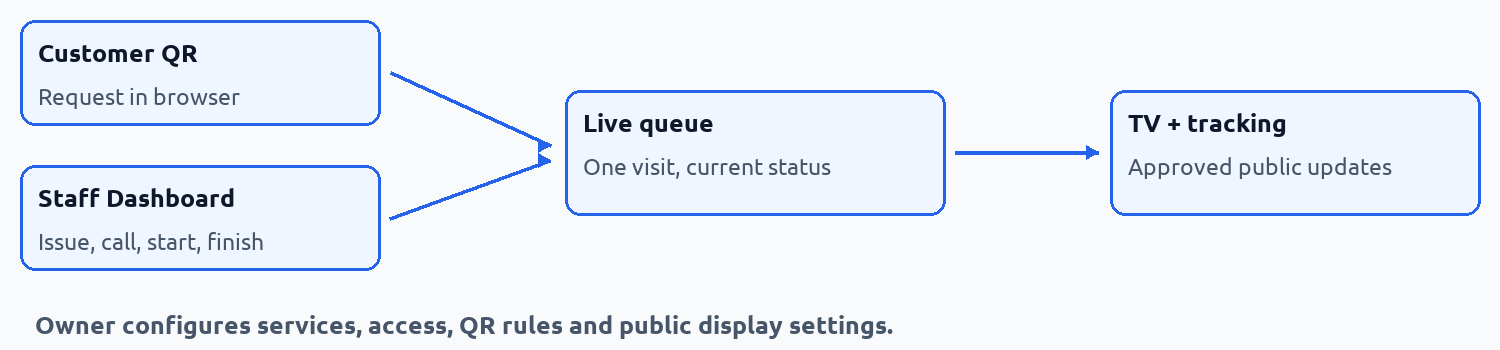 How the workspaces connect. Workflow illustration.
Words used in the app
| Term | Meaning |
|---|---|
| Token | A numbered record for one visit, such as T-24. It can contain more than one selected service. |
| Queue | The business's current daily waiting and service flow. |
| Waiting | Issued and waiting to be called. |
| Called / Calling | Staff has called the token. Work has not necessarily started. |
| Serving | Staff explicitly started the service. |
| Held / On Hold | A called token is temporarily set aside so other work can proceed. |
| Completed | Work is recorded as finished. This is different from payment settlement. |
| No-show | A called customer did not attend. This is a closed outcome. |
| Cancelled | The visit is cancelled. This does not automatically refund a payment. |
| Skipped | Some customer-facing compatibility text uses this word. It is not a separate current backend token status; use the actual Hold or No-show action. |
| Service | A catalog item with a name, expected minutes, price and payment mode. |
| Counter | A named staff work point, where configured. It is not the TV device itself. |
| Outlet | A business location used in commercial descriptions. A full multi-outlet administration switch was not verified in this merchant interface. |
| ETA | Estimated arrival/turn time or wait. It changes with work, availability, breaks and queue state. |
| QR code | A scannable link assigned to your business's customer token page. |
| WhatsApp Wallet | Prepaid balance for eligible automated WhatsApp visit flows. It is separate from subscription payment and customer service payments. |
| Revisit | A qualifying return by the same customer, for eligible earlier services, under your configured rules. |
Edition 1.0. Use the controls available in your account. Get help if a step is unavailable.