 InCue
InCueChapter 14 of 23 · Updated 22 October 2026
Reports & analytics
On this page
Open, filter and inspect
Location: Merchant Reports tab/sidebar; Token History and Token Audit provide visit-level detail. Staff use Queue Dashboard Reports only with Reports access.
- Open Reports and wait for the report to load.
- Choose Today, Yesterday, Week, Month or an offered custom period. On staff Dashboard, the UI commonly limits its date choices to Today/Yesterday; use the options actually present.
- Apply the status filter: available merchant choices include All, Completed, No-show, Cancelled and Waiting.
- Read the selected date range before comparing numbers. Loading more history adds records, not another business day.
- Open a token to inspect saved services, charges, custom answers and audit times.
- Remove the filters when comparing with the whole-day Home count.
The backend can support a wider staff report boundary than the staff screen exposes; this is not a promise of an unlisted staff date picker. Owner custom reports are bounded to supported dates, not arbitrary future periods. Current plan and server access determine which blocks are returned.
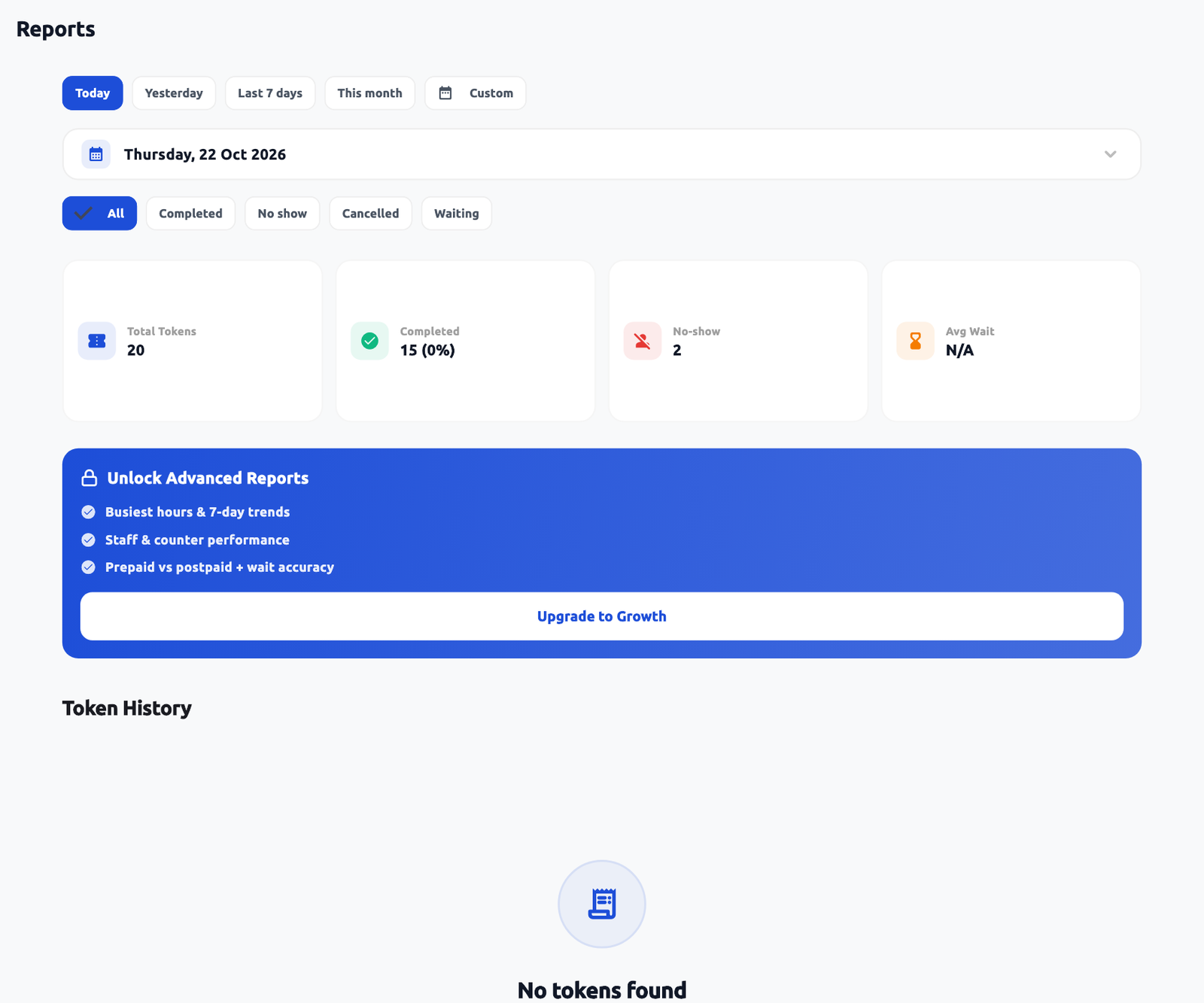 Report filters and plan-dependent blocks. Actual application interface with synthetic example data.1.Select the report period.2.Status filter changes the scope.
What the reports mean
| Block / value | Interpretation |
|---|---|
| Total Tokens | Issued token records for the selected scope. It is not necessarily unique people or completed visits. |
| Completed / No-show / Cancelled | Different final outcomes. Do not add no-shows to successful completions. |
| Waiting / Called / Serving | Current or scoped in-progress records. An old unresolved visit can differ from today's active view. |
| Avg Wait | Average from recorded issue-to-call/start timing for qualifying records; missing timestamps can be excluded. |
| Avg Service Time | Recorded start-to-completion time where qualifying timestamps exist. Opening an app does not record service work. |
| Collected | Amount recorded as charged/collected by the visit logic. It is not necessarily the gateway bank settlement. |
| Pending | Postpaid/unsettled visit amount remaining after charges and waivers. |
| Waived | Amount waived, including eligible revisit or closing rules. This is not automatically a gateway refund. |
| Services / demand | Work selected and handled by catalog item; a multi-service token can contribute more than one service. |
| Busiest Window / trends | Distribution over the selected period based on report data, useful for staffing decisions. |
| Staff / Counter Performance | Work attributed to the recorded staff/counter, not everyone who was logged in. |
| Payment Mode / Wait Accuracy | Prepaid vs Postpaid and estimated vs actual wait indicators. Treat missing data separately. |
| Needs Attention / bottlenecks | Higher-tier operational indicators; investigate the underlying visits. |
| Revenue Deep-Dive / WhatsApp Usage | Higher-tier business and usage summaries, distinct from audited accounts and provider settlement. |
| Customer Reviews | Reviews captured in InCue under current filters; external review sites are separate. |
Starter provides Basic Reports. Growth adds Advanced Reports; Pro provides Full reports and an export entitlement in the default plan model. The current merchant UI mentions CSV export in an upgrade card, but a working user-facing download/export control was not verified. Do not promise an export button that is not present. Ask support for the required report/export and approved access.
Clinic example
Compare a busy morning with the afternoon over the same week. Check token count, recorded average wait and staff/counter output together. If morning waits rise while one compatible counter is occupied, consider adjusting staffing or service duration estimates. A short average alone can hide a few long waits, so review individual delayed tokens before changing policy.