 InCue
InCueChapter 11 of 23 · Updated 22 October 2026
WhatsApp & wallet
On this page
WhatsApp is an optional, prepaid communication layer. It is separate from normal queue operation. A token can exist even when its WhatsApp message is not delivered. Having a paid InCue plan does not by itself prove that a sender, approved template, enabled automation and sufficient balance are ready.
Open and recharge the wallet
Location: Merchant Account > WhatsApp Wallet; the balance pill may also be visible in the workspace header.
- Open the wallet and check balance, current usage and any unavailable/error message.
- Use Recharge wallet. Choose an offered recharge pack rather than assuming an arbitrary amount is allowed.
- Review the pack, GST/checkout total and payment method. Complete the hosted payment once.
- Return and refresh the wallet. Confirm the credited transaction and the recharge invoice/status.
- If payment succeeded but balance did not update, keep the payment reference and contact support. Do not repeatedly recharge to recover an earlier payment.
Current default token-flow debit is ₹1 from prepaid balance for an eligible token flow. It is not ₹1 for every individual message in that flow. Provider acceptance and billing eligibility determine the charge record. Wallet recharge invoices handle applicable tax; the inspected token-flow debit does not add GST a second time. Always check the current wallet/checkout amount.
Appointment messaging has a separate implemented charge class with a default ₹0.50 appointment-flow rate in the inspected code. This is not clearly described by the public per-token price. Confirm the active rate with support and the actual wallet transaction before planning costs. It would be misleading to promise that every appointment message is covered by a token debit.
Which messages exist?
| Event | Implemented behaviour / boundary |
|---|---|
| Token generated | Confirmation/tracking message for an eligible generated token. |
| Turn approaching | One eligible planned reminder window, or selected next/delay/early update under the notification policy. The initial wait and deployment settings determine the window; see the full Smart ETA lesson in Chapter 5. It is not a message on every ETA change. |
| Called / now serving | Turn/counter notification. Existing flags help avoid repeating the same journey update. |
| Counter transfer | A separate eligible transfer update can communicate the new counter. |
| Work completed | Completion may trigger the feedback-link path. A separate generic customer “completed” text/template is not promised here. |
| Feedback request | Supported after eligible completion; destination can be InCue feedback or the configured external link. |
| Appointment booked | Supported appointment confirmation path. |
| Appointment reminder | Day-before and same-day reminder paths exist; timing and operating conditions apply. |
These are implemented event paths, not guarantees that every visit receives every message. Delivery depends on current account configuration, consent/withdrawal state where applicable, a usable WhatsApp number, balance, provider availability and template approval. A TV voice announcement is unrelated to WhatsApp delivery.
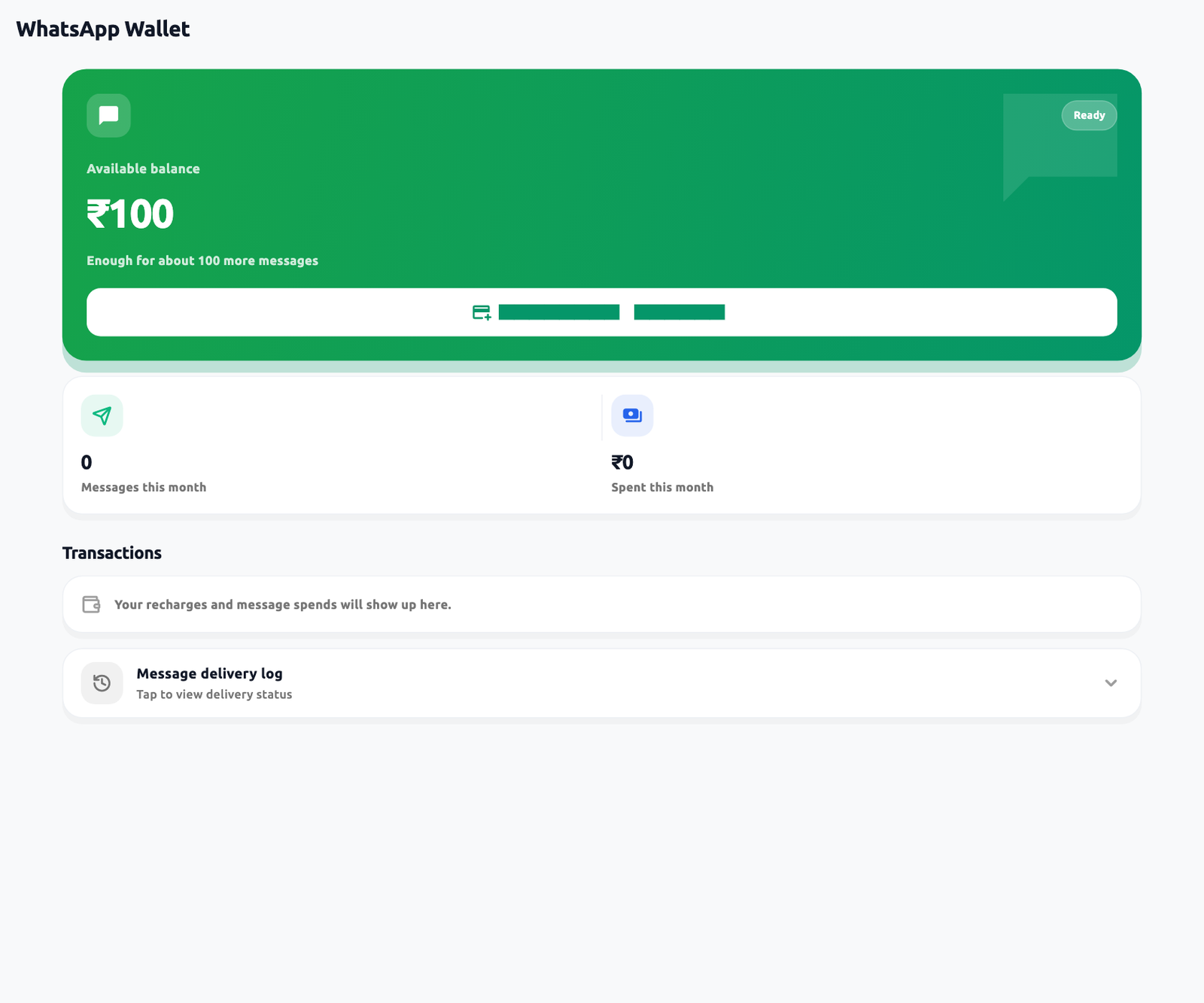 Wallet balance and delivery log. Actual application interface with synthetic example data.1.Balance and recharge control.2.Open delivery log; Sent and Read differ.
Low balance, delivery logs and disabling
When a new billable flow lacks sufficient balance, WhatsApp can be skipped/rejected while normal token/queue processing continues. Already charged flow updates can follow different checks; read the transaction/message result rather than multiplying message count by ₹1. Recharge before busy periods. Low-balance indication is a warning, not an automatic recharge authorization.
Review the wallet's Transactions, usage and message-log sections where loaded by the current account. “Sent” normally means the provider accepted the request; it is not proof the customer read it. Delivered/read/failed results require provider feedback and may arrive later. Preserve the token number, event/time and masked error when escalating.
No general merchant-facing automation on/off toggle was verified in the current Wallet screen. Activation, account-level billing pause and provider/template setup may require InCue support. Do not tell staff to change an internal sender configuration. A customer can use the tracking-page update preference where present; marketing is not part of the token-update purpose.