 InCue
InCueChapter 10 of 23 · Updated 22 October 2026
Staff access & permissions
On this page
Add a staff member
Location: Merchant Staff > Add Staff. Who: merchant owner, with available seat entitlement.
- Enter a real authorized staff member's Phone number and Name. Do not share the owner login.
- Choose Dashboard user for reception or Counter user for assigned-service work.
- For Dashboard users, Manage queue is always enabled by the current editor. Add Reports access and/or Customer history only if needed.
- For Counter users, set Counter name and select at least one service this person can handle.
- Save using the form action. Check the new staff card and ask the member to test OTP login.
- Verify that the member sees only the intended operational tools and history.
The Staff app user choice is displayed as “Available in future” in this merchant editor. Separate staff-app code exists, but this guide does not promise that customers can activate/distribute it through the current screen.
Edit the member through the card menu. Remove access with the offered Remove Staff confirmation when they leave. This unlinks/disables access rather than erasing historical visit attribution. If the current edit form exposes active status, use it for temporary access changes; a dedicated password-reset flow was not verified. Resolve phone ownership/OTP problems through the registered identity or support.
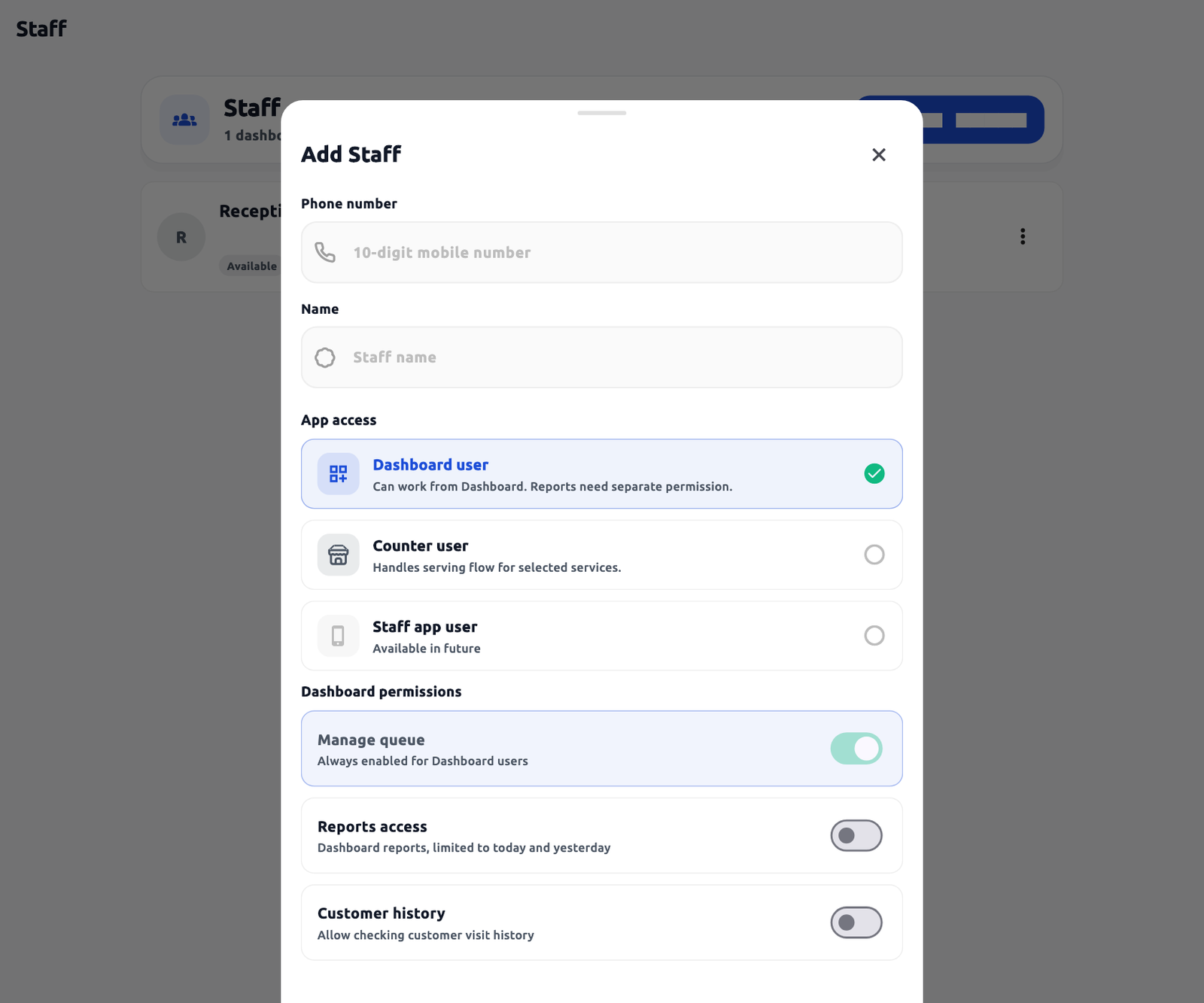 Staff access form. Actual application interface with synthetic example data.1.Choose Dashboard or Counter access.2.Grant only necessary extra permissions.
Role permission matrix
| Operation | Merchant owner | Dashboard user | Counter user | Customer / TV |
|---|---|---|---|---|
| Configure services, custom field definitions, business/TV settings | Allowed | Restricted | Restricted | Restricted |
| Fill required token inputs | Allowed in available token workflow | Allowed with generation/queue access | Depends on offered operational controls and permission | Customer fills only own QR form; TV read-only |
| Call, start, hold, complete | Allowed within account rules | Queue/call/complete permissions | Assigned services, own active slot and permissions | Restricted |
| Cancel waiting token | Allowed | Completion/queue permission | Only if offered and in permitted scope | No general customer cancel control verified |
| Transfer called token | Allowed in supported Dashboard workflow | Queue management; eligible target required | Restricted in Counter mode | Restricted |
| Reports | Account/plan dependent | Explicit Reports access; offered date scope | Restricted as exposed | Restricted |
| Customer visit history | Owner/available workflow | Explicit Customer history permission | Restricted | No access to other visits |
| Staff, devices and billing administration | Allowed with account entitlement | Restricted | Restricted | Restricted |
Roles such as “manager” are not a separate configurable role in the inspected merchant editor. Assign the actual permissions instead. Backend compatibility accepts several permission names, but the customer editor does not expose an arbitrary custom-role builder. A copied staff URL cannot override server permissions.