 InCue
InCueChapter 12 of 23 · Updated 22 October 2026
Customer live tracking
On this page
Open and understand the link
A customer receives or saves the individual tracking link after token generation. Open the complete link in a current mobile browser. Normal tracking does not require a customer login or app install. Treat the link as private access to that visit, not as a public business homepage.
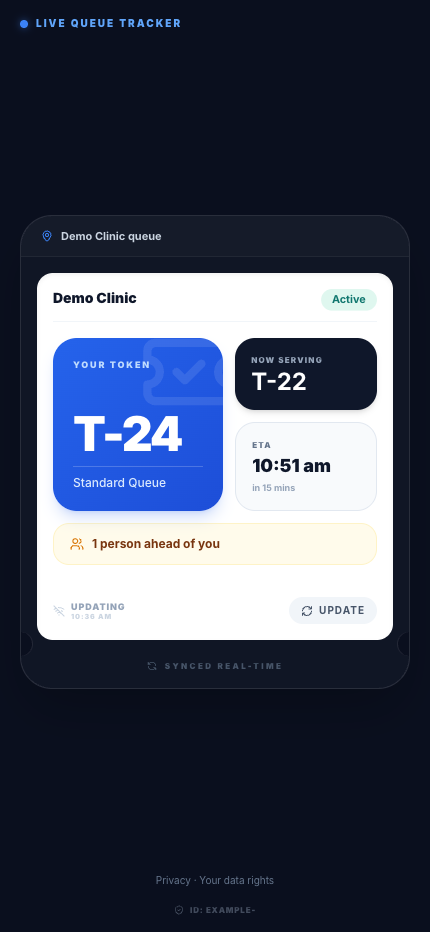 Customer tracking page. Actual application interface with synthetic example data.1.Your token number.2.Current serving and changing ETA.
Read the token number first. Then check status, tokens ahead/queue position, current serving information and the ETA/range if available. The page can show merchant location or arrival instructions. When the token is Called, follow the displayed counter/arrival instruction promptly. A Serving state means the work was started; Completed, No-show and Cancelled are final outcomes with different meanings.
Updates and limitations
The page tries a live connection when enabled and falls back to periodic checks, approximately every 30 seconds while visible. Hidden/background pages suspend activity and refresh when shown again. Use the displayed refresh control if the page looks stale. A phone in battery-saving mode or without internet cannot receive immediate visible updates.
ETA is an estimate. Staff work, compatible counters, a pause or business break can change it. Do not arrive at the very last second based solely on the earliest estimate. A paused/closed business state takes priority over an old displayed ETA. For missing details, use the link issued for the token rather than manually typing identifiers.
WhatsApp preference/withdrawal controls are visit-specific where available. Turning updates off does not cancel the token or delete the visit. For correction/deletion questions, use the business and InCue's data-rights channel.